

Text-to-Image Generation with Fine-Tuned SDXL [QLoRA]
Example Prompts:
1. A young, attractive female with arched eyebrows and a pointy nose. She has wavy brown hair, wears heavy makeup with lipstick, and exudes a confident, stylish look. The scene features soft, flattering lighting that enhances her youthful features and glamorous appearance.
2. A male with an oval face, big nose, high cheekbones, and a receding hairline. He has black hair, bushy eyebrows, and his mouth is slightly open in a smile. The subject is clean-shaven, with no beard.
3. Male with a big nose, black hair, bushy eyebrows, high cheekbones, and a receding hairline. He has an oval face, a mouth slightly open in a smile, and is clean-shaven with no beard.
Goal of this project: This project focuses on building an advanced text-to-image generation system using the Stable Diffusion XL (SDXL) model, a state-of-the-art deep learning architecture. The goal is to transform natural language text descriptions into visually coherent and high-quality images, unlocking creative possibilities in areas like art generation, design prototyping, and multimedia applications.
To enhance performance and tailor the model to specific use cases, SDXL is fine-tuned using QLoRA (Quantized Low-Rank Adaptation). This approach leverages efficient parameter fine-tuning and memory optimization techniques, enabling high-quality adaptations with reduced computational overhead. Fine-tuning with QLoRA ensures that the model is optimized for domain-specific text-to-image tasks, delivering even more precise and creative outputs.
Simplified Architecture: 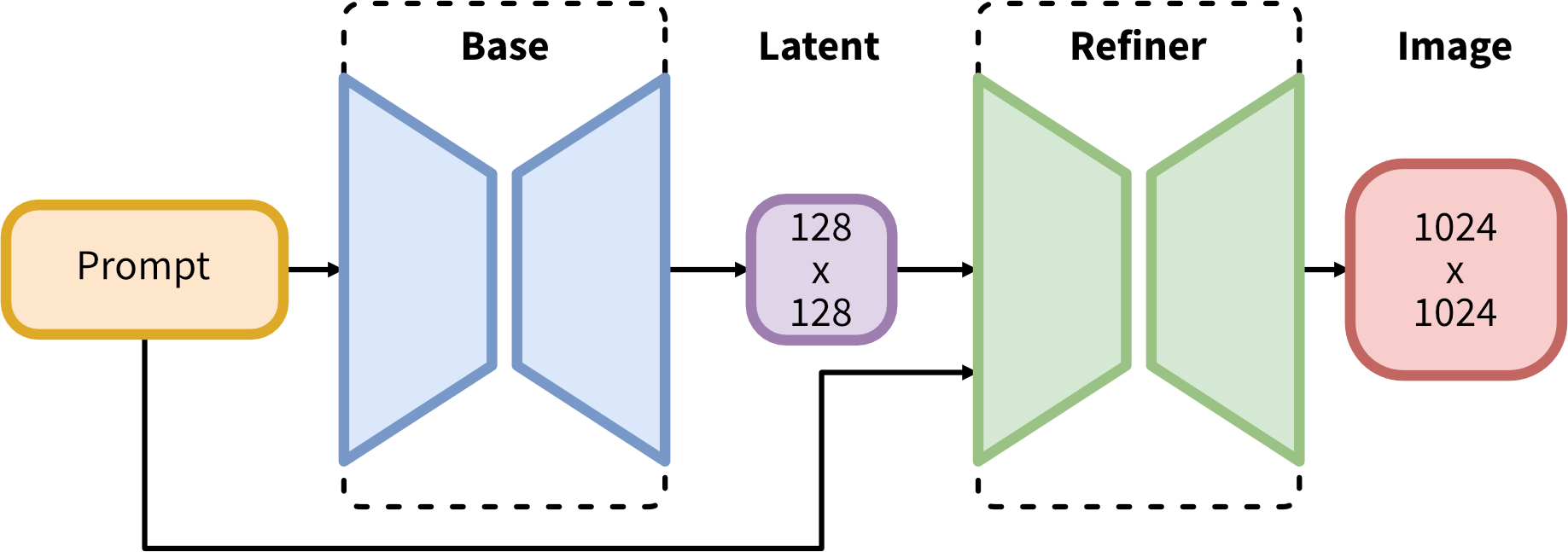
Dataset Description: CelebFaces Attributes Dataset (CelebA).
The CelebA dataset is a widely-used, large-scale dataset in the field of computer vision, particularly for tasks related to faces. It consists of over 200,000 celebrity face images annotated with a rich set of attributes. The dataset offers diverse visual content with variations in pose, facial expressions, and backgrounds, making it suitable for a range of face-related applications.
Here are few examples of generated images Using Stable Diffusion SDXL:
Before Fine-Tuning SDXL

After Fine-Tuning SDXL on Custom Dataset


How to use
import torch
from diffusers import DiffusionPipeline

model_path = "Shuhaib73/stablediffusion_fld"

trained_pipe = DiffusionPipeline.from_pretrained("stabilityai/stable-diffusion-xl-base-1.0", torch_dtype=torch.float16)
trained_pipe.to("cuda")
trained_pipe.load_lora_weights(model_path)
- Downloads last month
- 13
Model tree for Shuhaib73/stablediffusion_fld
Base model
stabilityai/stable-diffusion-xl-base-1.0